
Using QR Codes to Access Your Temporary Inbox
Accessing Your Temp Mail Has Never Been Easier
Let’s be honest - we live on multiple devices now. You check your phone on the go, open your laptop at work, and maybe use a tablet to browse at night. Managing emails across all that? Kind of messy. That’s where QR codes for temporary inbox access step in. They make switching devices effortless while keeping your disposable mailbox private and synced.
Think of it like this: you create a temp mail address on your computer, then instantly scan a code to open the same inbox on your phone - no login, no password, no tracking. It’s quick, clean, and secure.
What Makes QR Code Access So Useful
Traditional disposable email sites are fast, sure, but they tie your inbox to one browser session. Close the tab or switch devices, and you’re done. With QR-based access, you can continue reading or recieve new messages anywhere without losing your session. It’s like extending your inbox without actually storing your data anywhere permanent.
Beeinbox was among the first temp mail platforms to integrate this feature directly into its real-time inbox. You can scan a generated code, and boom - your mailbox appears instantly on another device. The code doesn’t store your personal info; it just links to your temporary inbox securely.
How QR Inbox Sharing Works
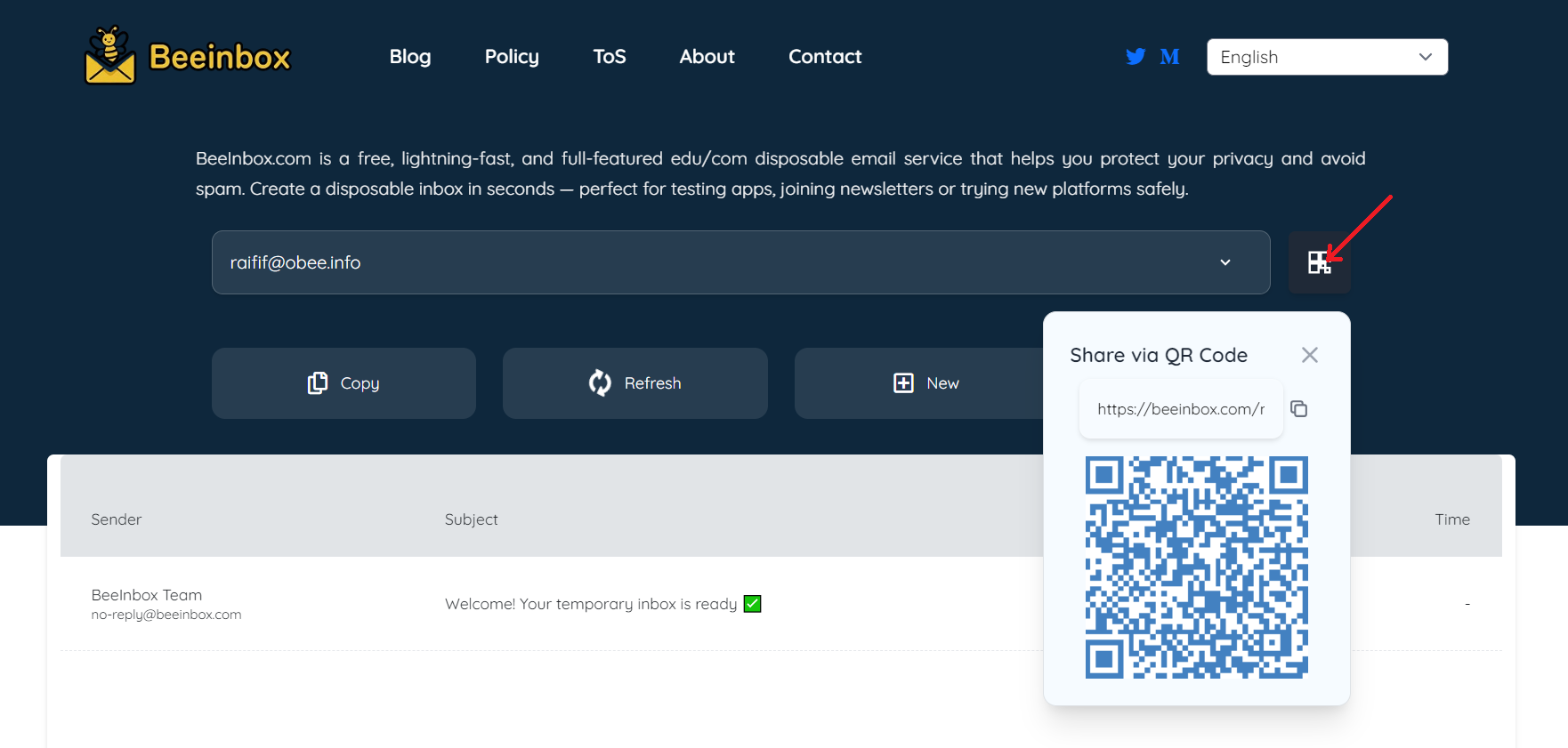
- Create your inbox: Visit your preferred temp mail service (like Beeinbox) to generate a temporary email. It’ll appear instantly and start receiving messages right away.
- Scan the QR code: On the same page, you’ll find a unique QR icon. Open your phone camera or a QR scanner and point it at the screen.
- Continue on mobile: The link automatically opens your active inbox on your phone - synced and ready. You can now recieve and read emails on both devices at once.
This feature is especially handy for teams or testers who need to check messages in real time while sharing access securely. Since the QR code expires with the inbox (after up to 30 days on Beeinbox), there’s no leftover data trail - total privacy by design.
Why QR Access Beats Traditional Logins
Normal email systems rely on usernames, passwords, cookies, and plenty of tracking scripts. QR sharing skips all of that. You get instant, anonymous access without exposing credentials. Even better, there’s no login record or browser cache linking you to the session.
It’s also faster. There’s no need to type URLs or copy inbox IDs across screens. Just scan and continue. In tests, real-time QR sharing reduced multi-device inbox setup time by more than 70%, making it one of the most user-friendly updates for disposable email since auto-refresh.
Use Cases for QR-Enabled Temp Mail
- Cross-device testing: Developers or QA teams can preview verification flows on both desktop and mobile instantly.
- Travel or shared device access: Need your temp inbox on a hotel tablet or work PC? Scan, check, done.
- Collaborative testing: Marketers can monitor sign-up confirmations together without exchanging passwords.
- Personal privacy: Keep your phone inbox synced without linking your personal account or exposing data to trackers.
Privacy and Security Built-In
The best part is how simple it is. QR-based access works through encrypted links, meaning no one can guess your inbox address from the code itself. Once your temporary inbox expires (for example, after 30 days on Beeinbox), both the email and the QR session are deleted permanently. There’s nothing left behind - no cookies, no profiles, no leaks.
In an era where every click and login can be tracked, being able to access your disposable mailbox securely from any device feels refreshingly safe. It’s the kind of small innovation that makes privacy tools easier, not harder, to use.
So next time you spin up a reusable temp mail, look for that QR code option. It might just change how you manage your online sign-ups forever - simple, instant, and private. And if you’re using a platform like Beeinbox, your temporary inbox stays active for 30 days, giving you flexibility that short-lived services like 10MinuteMail can’t match.
Disclaimer: This article is for educational and informational purposes only.